August 20, 2010 |
  Author
 Ich wollte mir ein eigenes Theme für mein Blog gestalten, mit dem längerfristig zufrieden bin. Die bei WordPress zum Download angebotenen Themes sind zwar alle ganz nett, allerdings gefällt mir immer irgendeine Kleinigkeit daran nicht. HTML und CSS ist nicht schwer zu editieren, um die Themes anzupassen, allerdings sind die Theme-Templates oft so komplex und verschachtelt, dass es eine regelrechte Fleißarbeit ist, Änderungen vorzunehmen. Meistens muss man per Try’n’Error mühsam herausfinden, an welcher Stelle genau etwas geändert werden muss.
 Also habe ich mir vor einer Weile Artisteer für Mac OS X heruntergeladen und getestet. Während die Version 2.5 für Windows bereits stable ist, wird die Mac OS X Version 2.5 noch als “beta” angegeben. Und genau das merkt man auch bei der Benutzung. Dennoch ist Artisteer brauchbar und bietet von Haus aus die Möglichkeit, Themes für verschiedene Systeme, darunter WordPress, Blogger, Joomla, Drupal und mehr zu erstellen. Auch ein Export als reines XHTML+CSS ist möglich.
 Posted in daily life, tech |
  Tags: artisteer, blog, erfahrungsbericht, html, internet, mac os x, testbericht, wordpress |
  2 Comments »
Ich wundere mich seit Tagen über extrem angestiegenen Traffic für meinen URL Shortener unfake.it. Des Rätsels Lösung ist wohl sehr einfach: eine Google-Suche nach “url faker” liefert 19.400.000 Ergebnisse. Und unfake.it ist auf Platz 1 inkl. Mini-Sitelinks, Platz 2 ist mein Blog-Artikel über unfake.it vom 25. Januar 2009. Das ist ziemlich neu, da bin ich mir relativ sicher.
Da wundert mich nichts mehr. Leider, leider gerät das System aber so langsam aber Sicher an die Lastgrenzen und ich muss mir überlegen, ob ich nicht doch eine meiner Regeln breche, denn ich hatte ursprünglich beschlossen und kommuniziert, dass unfake.it niemals Werbung vor oder nach dem Klicken einer Kurz-URL anzeigen wird.
Was meint ihr? Sollte ich Werbung schalten und so ggf. neue, schnellere Hardware finanzieren? Oder findet sich ggf. irgendwo ein freundlicher Sponsor? Bin gerne bereit, darüber zu verhandeln 🙂
Posted in daily life, tech | Tags: API, Google, html, internet, linux, programming, sponsoring, unfake, unfake plugin, url shortening | 2 Comments »
 Habe heute Abend Woopra getestet. Geboten wird ein Dienst, welcher Echtzeit-Statistiken von Webseiten generiert. Hierzu wird ein Javascript-Code-Schnipsel auf der gewünschten Website eingebunden, welche einen Connect auf die Woopra-Server macht und dabei Server- und Client-Daten übermittelt. Nette Idee, funktioniert auch. Für mich dennoch untauglich. Mehr dazu weiter unten.
Die Bedienung der Woopra-Website ist einfach und intuitiv. Zunächst muss ein Profil angelegt und per E-Mail-Verifizierung bestätigt werden. Dann können die Websites (anhand von Domains) angelegt werden, die getracked werden sollen.
Im Quellcode der fraglichen Webseiten muss nun der kleine Javascript-Schnipsel eingebunden werden. Sofort darauf werden die Live-Statistiken entweder über das Dashboard der Woopra-Website oder aber über ein entsprechendes Desktop-Programm ausgegeben. Ich hatte den Mac OS X Client getestet. Dieser schaut sehr ansprechend aus und stellt die Informationen nett dar.
Für mich kommt Woopra in dieser Form nicht in Frage, denn es deckt nicht mal die Hälfte meiner Anwendungsfälle ab. Konkretes Problem ist, dass ich zahlreiche Seiten betreibe, die keinerlei oder besondere Header-Informationen senden und mit der Javascript-Ausgabe im BODY nicht klar kommen. Spätestens bei einem 301-Header ist hier Schluss, das funktioniert nicht mit Javascript.
Das erinnert mich daran, dass ich mit (m)einem unlängst eingeschlafenen eigenen Webanalyse-Tool weitermachen sollte. Bereits vor einem Jahr hatte ich eine lauffähige Version, die in ähnlicher Weise wie Woopra arbeitet und auch viele brauchbare Daten bereitstellt. Aus Zeitgründen war dieses Projekt eingeschlafen. Vielleicht mache ich bei Gelegenheit damit mal weiter und erfinde Google Analytics neu 🙂
Hi there!
I have to thank you! All of you, using unfake.it as URL shortening service!
It’s been 100 days, since I faked the first URL with unfake.it – my very own URL shortening service. I started this project, ’cause I always forgot the names of all the other URL shortening providers, so I very quickly wrote my own application, which now is used every day by lots of users.
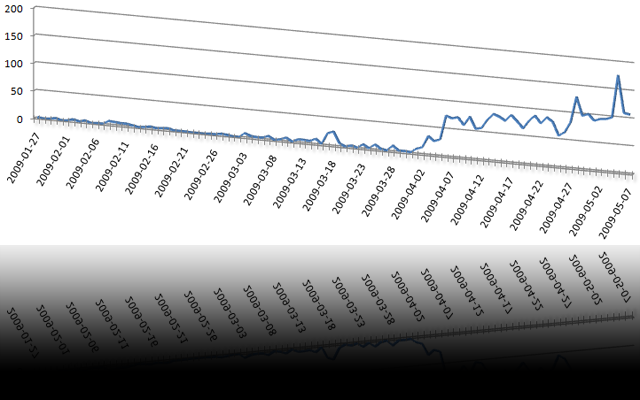
What began for my personal use only, has now become a huge and important project. A few days after the initial launch – and even without heavy announcement, the first people started using unfake.it to shorten URLs. Using the bookmarklet, some friends and co-workers started using unfake.it and spreading the URL all over the world.
Then, I implemented an API and wrote a standalone WordPress plugin to shorten URLs for new blog postings before sending them to Twitter. Since March, this plugin is downloaded and installed on new WordPress blogs almost every day a couple of times, which really makes me proud. Today, several co-workers as well as absolutely unknown users all over the globe are using my plugin. And there’s an huge number of hits per day:
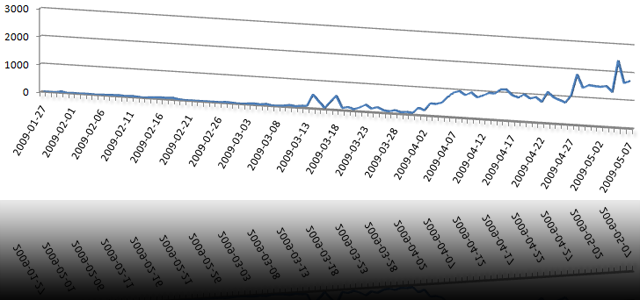
Then, I implemented the magic preview function with thumbnailed images of the destination websites. Then I wrote a facebook application to add faked URLs and their thumbnails to your facebook profile. Those are just toy-like features, but I relly like them – as well as lots of users.
Some facts of what has happened so far (or is happening):
- more than 3.000 URLs have been faked up to now
- there are more than 42.000 hits to those URLs up to now
- the last 3 days, more than 100 new URLs have been added per day
- URLs for more than 130 unique websites have been faked up to now
- the WordPress plugin has been downloaded and most likely installed more than 80 times
- Twitter knows more than 850 faked URLs of the last 7 days
- Google knows more than 20 pages of faked URLs
- unfake.it is growing every day
I’m really looking forward to unfake.it‘s future. Sure, there is an increasing number of shortening services, but I guess, some of ’em will disappear again.
Bye, T.
Posted in tech | Tags: blog, facebook, Google, html, internet, programming, twitter, unfake, unfake plugin, url shortening, wordpress | 1 Comment »
Hi there!
Because some of you asked, how I realized the grabbing and thumbnailing of whole websites (here’s an example and I wrote about that in this post), this is a brief HOWTO.
Imagine, you have a Linux system without graphical support. How do you display complex graphical content and make a screenshot? Here it comes: grabbing websites on a Linux system is quite simple.
Prerequisites:
- a Linux operating system (Debian is fine)
khtml2png(I usedkhtml2png_2.7.6_i386.debfrom here)- a running X server (
Xvfbdoes it for me) kdelibs4c2alibkonq4
This is it!
The trick now is: on a system working as a server, you usually don’t want to have a running X server. So, I just installed Xvfb, which is a “Virtual Framebuffer ‘fake’ X server”. It is running in the background and khtml2png uses its display.
First, install Xvfb and several libs:
apt-get install xvfb kdelibs4c2a libkonq4
Hit ‘y’ to solve dependencies!
Now, get khtml2png from http://sourceforge.net/projects/khtml2png/ and install it:
dpkg -i khtml2png_2.7.6_i386.deb
Then, start your ‘fake’ X server:
/usr/bin/Xvfb :2 -screen 0 1920x1200x24
Of course, you may reduce the resolution to your needs. But remember the display number (:2) you set for Xvfb.
And finally, you may use khtml2png to fetch any website you like:
/usr/bin/khtml2png2 --display :2 --width 1024 --height 768 http://www.thomasgericke.de/ /tmp/website.png
Don’t worry about the fact that the package is named khtml2png and the binary is called khtml2png2. It’s okay!
I have a little magical wrapper around that stuff which gets URLs out of a database and performs some checks. Images are save with wget and converted to PNG, websites are fetched with khtml2png. Both are saved and thumbnailed on-the-fly with PHP.
I call khtml2png via cron like this:
/usr/bin/khtml2png2   --display :2 \
                      --width 1024 \
                      --height 768 \
                      --time 42 \
                      --disable-js \
                      --disable-java \
                      --disable-plugins \
                      --disable-redirect \
                      --disable-popupkiller \
                      http://www.thomasgericke.de/ \
                      /tmp/website.png
My script is started every minute and checks if new URLs have to be fetched. It also checks if existing PNGs are older than 24 hours and, if so, the URL will be fetched and the PNG overwritten.
Just let me know, if you have any further questions.